How to dispute unfair refunds on Glovo, Uber Eats and Just Eat
A wrongly applied refund can be recovered, but only if you spot it, document it and present it as an individual case. This is the complete guide, platform by platform.
A guide for operations managers, franchisees and dark kitchens. If you are a Glovo customer wanting to claim on your own order, the channel is Glovo customer help, from the Help section of your profile in the app.

Every delivery platform works the same way on this: when a customer complains, the refund is settled quickly and the adjustment is applied to the restaurant. It is a logical design from the platform's point of view (the customer is the one who can switch to another app) and an expensive one from the point of view of your bottom line.
The part many restaurants never work on is that the adjustment is not final. It can be challenged. What decides whether the money comes back is not persistence, it is evidence.
Can you challenge a refund the platform has already charged you for?
Yes. The three big delivery platforms in Spain (Glovo, Uber Eats and Just Eat) all have a claims channel in their management portal for restaurants to dispute adjustments applied to an order. The claim is submitted order by order and succeeds when it comes with proof of what was handed over, such as a dated, time-stamped photo of the prepared order. Without proof, it is your version against the customer's.
Before you claim: separate the charges that are yours from the ones that are not
Not every adjustment is worth challenging, and chasing all of them burns time and credibility. These are the three types that do deserve a claim:
- The item was in the bag: the customer claims a missing item that was prepared and handed over.
- The problem happened outside the site: the issue arose in transport or delivery, not in the prep.
- The pattern is suspicious: the same customer claims repeatedly across different orders.
And the ones worth accepting and fixing: an out-of-stock item served incomplete, a modification not applied, a genuine assembly error. There the work is not to challenge, it is to fix the process.
The procedure, platform by platform
The names change, the mechanics do not: identify the order and its adjustment in the portal, open the claim on that specific order and attach the evidence.
| Platform | Where the charge appears | How to challenge it |
|---|---|---|
| Glovo | The order history in the management portal, with the deduction, compensation and customer complaint labels. | Directly from the order marked with a deduction, providing evidence of what was prepared. |
| Uber Eats | The order detail and payment summary in the management portal, where applied adjustments appear. | By opening the dispute on the affected order inside the portal, with proof of the order delivered. |
| Just Eat | Order and billing report in the restaurant portal. | Through the restaurant support channel, quoting the order number and attaching the evidence. |
Since the portals move things around fairly often, the rule that never fails is this: the claim is made on the order, not on the statement. If you start from the month's aggregate figure, there is no case to present.
Deadlines are what sinks the most cases, and every platform sets its own. The Uber Eats help page on refunds for incomplete or incorrect orders gives 30 days from the date of the original order, and the dispute is filed with the self-service tool in the management portal. On the Glovo pages we consulted on 10 September 2026 no equivalent window is published, so it is worth confirming it with your account manager before building the routine around it.
For the detail on Glovo's labels, which is where most restaurants get lost, see our guide to Glovo refunds.
The four steps that actually work
- Spot the charge early. Review orders with adjustments every week. The fresher the order, the easier it is to reconstruct what happened and the more weight the claim carries.
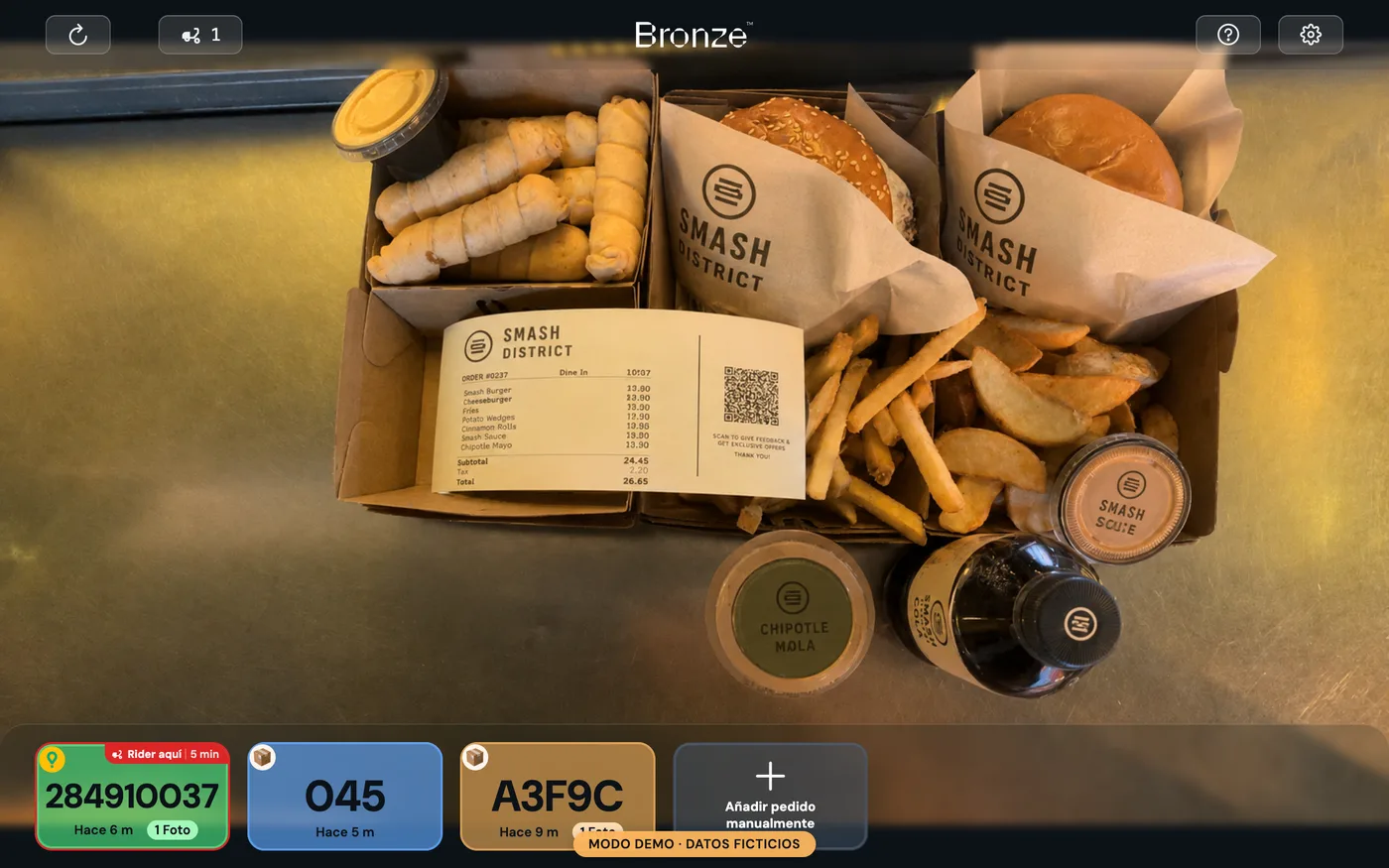
- Gather the evidence for that order. The dated, time-stamped photo of the assembled order, the docket with its lines and modifications, and the incident log if there was one.
- Submit claims one at a time. One order, one case, one piece of proof. Bulk claims get bulk answers, and almost always a no.
- Follow up and record the outcome. Keep track of what was claimed, what was won and what was lost. That history is what tells you which reasons are worth pursuing and which are not.
What evidence holds a claim up
In order of how much weight it actually carries with the platform:
- A photo of the complete order before it is sealed, dated, time-stamped and linked to the order number. It is direct proof: you can see what was handed over.
- Automatic verification against the order: not just the image but the record that the system checked what was prepared against what was ordered and passed it.
- The POS or platform docket with the lines and modifications applied.
- The customer's claims history, where the platform lets you see it. A repeated pattern changes the conversation.
What does not work: the word of whoever was on shift (“I packed it and it was in there”), a generic photo of the counter with no identifiable order, or a screenshot of the docket with nothing to show what actually went into the bag.
Five mistakes that sink a well-founded claim
- Claiming late. The case weakens over time and some channels stop accepting disputes after a set period (on Uber Eats, 30 days from the date of the original order).
- Claiming in bulk. An email with twenty orders is not twenty claims: it is one general complaint.
- Attaching the wrong proof. A photo that does not belong to that order undermines the credibility of all the others.
- Claiming everything. If you also dispute the genuine mistakes, the channel starts reading you as noise.
- Not recording the outcome. With no history you start from scratch every week and never learn what works.
Disputing through official channels, case by case and with proof, does not damage your relationship with the platforms. Quite the opposite: it reduces the fraud that costs them money too and makes your metrics reflect what really happens in your kitchen.
When to stop doing it by hand
A site with a handful of orders a day can sustain this routine with a spreadsheet. With several sites you cannot: the admin time eats up the amount recovered and there are always cases left unfiled.
That is the part Bronze Tracker automates. Every order is photographed and verified with computer vision before it goes out (under a second per order), and when an unwarranted refund lands, the dispute is filed with that photo as proof. More than half of disputes are handled without anyone on your team touching a thing, and in the Hub you see what has been claimed, what has been won and how much you have recovered.
The benchmark figures, as of July 2026: 83% of disputes filed with photo evidence are won (on disputes resolved in the last 12 months) and we have recovered £1.89M for our customers, more than £860k in 2026 alone.
What to take away
- The platform's adjustment is not final: you challenge it on the specific order, never on the statement.
- The evidence that wins cases is the time-stamped photo of the verified order, not an explanation from whoever was on shift.
- Be selective: challenge what is unfair and fix what really was your mistake.
Sources
- Uber Eats, managing refunds for incomplete or incorrect orders: help.uber.com. Consulted 10 September 2026.
- Just Eat, managing your business from the Partner Hub: partnerinfo.just-eat.es. Consulted 10 September 2026. No readable content at that time.
- Glovo, customer help: glovoapp.com. Consulted 10 September 2026.